Flower Bouquet Filter: Upload 1–3 Selfies, Get a Bouquet of Your Face
Upload 1 to 3 selfies and Musely returns a kraft-paper bouquet where every bloom is your face. Choose from 3 bouquet styles and 5, 7 or 9 faces. About 1 minute.


This is where amazing happens
The flower bouquet filter is a photo edit that turns selfies into a gift bouquet where every bloom is your own face, also called a flower bouquet with face, a face bouquet or a bouquet of me. On TikTok it circulates as a CapCut template: a tutorial was posted in mid-February 2026, and the #flowerbouquetofme version appeared on 3–4 November 2026. Musely Flower Bouquet Filter makes the same picture in a browser from 1 to 3 selfies, with 3 bouquet styles and 5, 7 or 9 faces, in about 1 minute. It is not affiliated with TikTok or CapCut.
What the Flower Bouquet Filter Offers
🤖Bouquet Options
Input, Output and Pricing
Make a Flower Bouquet With Face Photo in Three Steps
Upload 1 to 3 Selfies
Add 1 to 3 clear selfies, chest up, with your face uncovered and in even light. This is the only required input. Use photos of yourself, or one photo each of up to 3 adults who agreed.
Pick the Bouquet (Optional)
The defaults give the look from the TikTok posts: Cut-Out Face Blooms, 7 faces, brown kraft paper with a white polka-dot bow, soft pink background. You can switch to Faces in Flower Centers or Face Blooms Mixed with Real Flowers, choose 5 or 9 faces, or tap a preset: Valentine Hearts, Birthday Confetti, Couple or Besties. Advanced Settings hold Flower Type, Wrapping, Background, Presentation, Expressions and Things to Avoid.
Generate and Download
Press Generate. Musely returns your bouquet of me in about 1 minute. Download the picture, or press Generate again for another variation. For TikTok, Reels and Shorts, set the aspect ratio to 9:16 in Output Settings first.
What People Make With a Bouquet of Me
A Bouquet of Your Face as a Gift Picture
Upload one selfie, tap the Valentine Hearts preset and send the picture as a joke gift. The hearts are added around the classic kraft-paper bouquet.
A Birthday Bouquet Without the Florist
The Birthday Confetti preset adds confetti and a blank gift tag to the bouquet. Pick 5 faces if the picture will be viewed small in a chat.
Two or Three People in One Bouquet
Upload one photo per adult, up to 3, and tap Couple or Besties. The blooms alternate between the people and each face stays separate.
Joining the Trend Without the CapCut App
Keep the default Cut-Out Face Blooms style and set 9:16 in Output Settings. The result is a still picture, so add your own sound when you post it.
A Square Face Bouquet for a Profile
Set 1:1 in Output Settings and choose 5 faces so each one stays readable at a small size. A Plain White Studio Backdrop keeps the bouquet easy to crop.
Your Face in the Center of Real Flowers
Choose Faces in Flower Centers and a Flower Type such as Sunflowers or White Daisies. Set Presentation to Held Up in One Hand for a hand-held bouquet.
Musely vs the CapCut Template, ChatGPT and MakeViral
| Feature | Musely | CapCut template | ChatGPT | MakeViral |
|---|---|---|---|---|
| How You Start | ✓ Upload 1 to 3 selfies in a browser and press Generate | ⚠ Tap the CapCut template link on a TikTok post | ⚠ Upload a selfie and write your own prompt | ✓ Add 1 to 3 selfies in a browser and press Generate |
| Prompt Writing | ✓ None, the prompt is built in | ✓ None, it is a template | ✗ You write and refine the prompt yourself | ✓ None, the prompt is built in |
| Choices | ✓ 3 bouquet styles, 5, 7 or 9 faces, 6 wrappings, 6 backgrounds | ⚠ The template's own layout | ✓ Anything you can describe in words | ⚠ 4 versions: one selfie, 3 selfies, couple, pet |
| App Needed | ✓ No, it runs in a web browser | ⚠ The CapCut app | ✓ No, browser or app | ✓ No, it runs in a web browser |
| Output | ✓ One still image at 1K; 2K and 4K on Creator and above | ✓ An edit made inside the CapCut app | ✓ One still image | ✓ One 2K photo at 9:16 |
| Price to Try | ✓ Free plan: 25 multimedia credits every 30 days, 10 credits per standard image | ⚠ Not checked; see the CapCut app | ⚠ Depends on your ChatGPT plan's image limits | ⚠ 3 credits per photo; smallest pack is $9.99 for 100 credits |
| Relation to TikTok and CapCut | ⚠ Independent tool, not affiliated with either | ✓ The template the TikTok posts link to, used inside CapCut | ⚠ Independent, not affiliated with either | ⚠ Independent tool |
Flower Bouquet Filter Questions
The flower bouquet filter trend is a picture of a kraft-paper bouquet in which every bloom is a cut-out of your own face, also called a face bouquet or a bouquet of me. On TikTok it is made with a CapCut template: a tutorial was posted in mid-February 2026, and posts tagged #flowerbouquetofme followed on 3–4 November 2026. Musely makes the same picture in a browser from 1 to 3 selfies.
Making a flower bouquet with face photo on Musely takes three steps. 1. Upload 1 to 3 selfies. 2. Keep the defaults (Cut-Out Face Blooms, 7 faces) or pick another bouquet style and 5 or 9 faces. 3. Press Generate and download the picture after about 1 minute. The photo is the only required input.
The flower bouquet filter is free to try on Musely: the free plan includes 25 multimedia credits every 30 days, with no card needed, and a standard 1K image costs 10 credits, so that covers two bouquets. For more, the Creator plan is $9.99 a month billed annually ($119.9/year) with 1,000 credits per month, listed as 100 images.
A clear, front-facing selfie from the chest up works best for a face bouquet, with your face uncovered and in even light. Skip sunglasses, hats, heavy beauty filters and group shots. Musely accepts 1 to 3 photos: add different looks of yourself, or one photo each of up to 3 adults who agreed. Choosing 5 faces instead of 9 makes each face larger.
One flower bouquet filter picture takes about 1 minute on Musely. That is one generation at the standard 1K resolution, with nothing to install. Press Generate again for a new variation; each standard image uses 10 credits.
Your photo is uploaded to Musely's servers to make the picture, and this is not an official TikTok or CapCut filter: Musely is not affiliated with either company. Musely's Privacy Policy says it collects uploaded files to generate results and processes deletion requests within 90 days of receipt. The version in the TikTok posts is a CapCut template.
Musely sits between the two. The CapCut template gives the exact edit from the TikTok posts but opens in the CapCut app, and ChatGPT can draw a face bouquet only after you write and refine the prompt yourself. The Musely flower bouquet filter needs no prompt and no app, and adds choices: 3 bouquet styles, 5, 7 or 9 faces, and 6 wrappings.
Flower bouquet filter examples
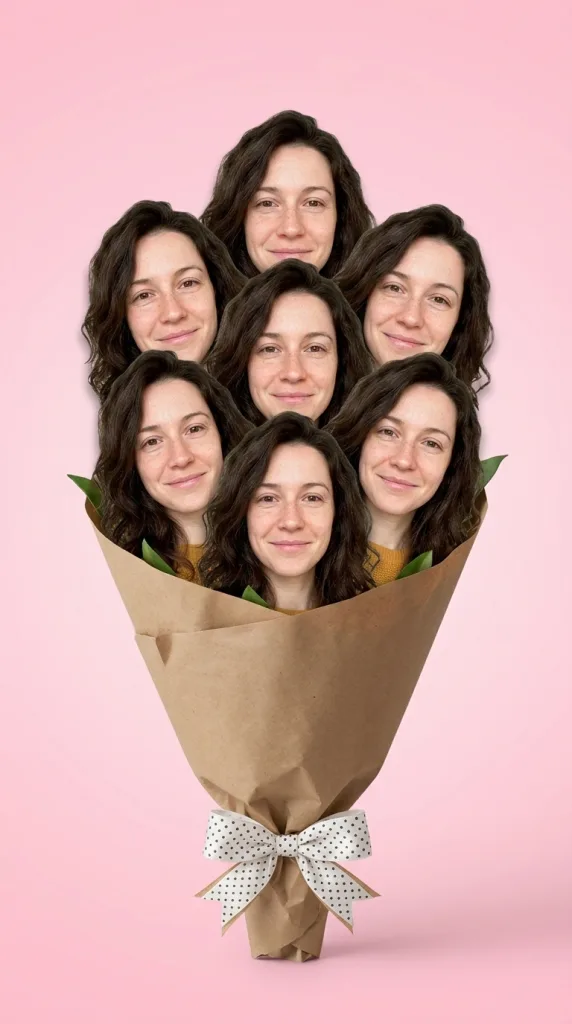
Bouquet Style: Cut-Out Face Blooms · Number of Faces: 7 faces · Wrapping: Brown Kraft Paper with White Polka-Dot Bow · Background: Soft Pink Gradient · Presentation: Standing on Its Own · Expressions: Same Expression as the Photo

Bouquet Style: Cut-Out Face Blooms · Number of Faces: 7 faces · Wrapping: Brown Kraft Paper with White Polka-Dot Bow · Background: Soft Pink Gradient · Presentation: Standing on Its Own · Expressions: Same Expression as the Photo
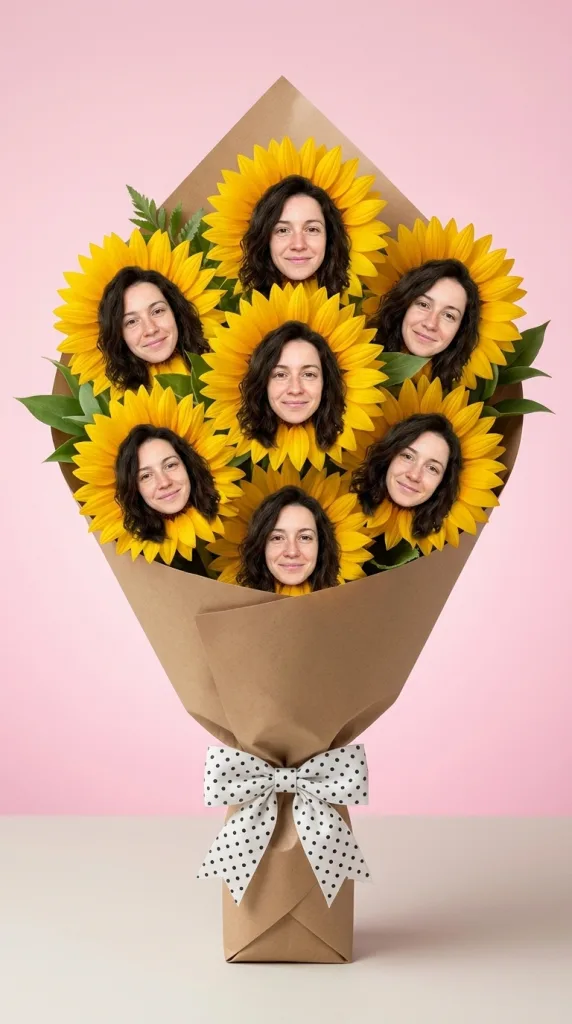
Bouquet Style: Faces in Flower Centers · Number of Faces: 7 faces · Flower Type: Sunflowers · Wrapping: Brown Kraft Paper with White Polka-Dot Bow · Background: Soft Pink Gradient · Presentation: Standing on Its Own · Expressions: Same Expression as the Photo