
適用商店上架和本地化的應用程式截圖翻譯工具
上傳任何應用程式截圖,即可獲得136種以上語言的翻譯版本。Musely以99.4%的文字準確率保留您的UI設計,約60秒內交付符合應用程式商店要求的成果。

精彩由此開始
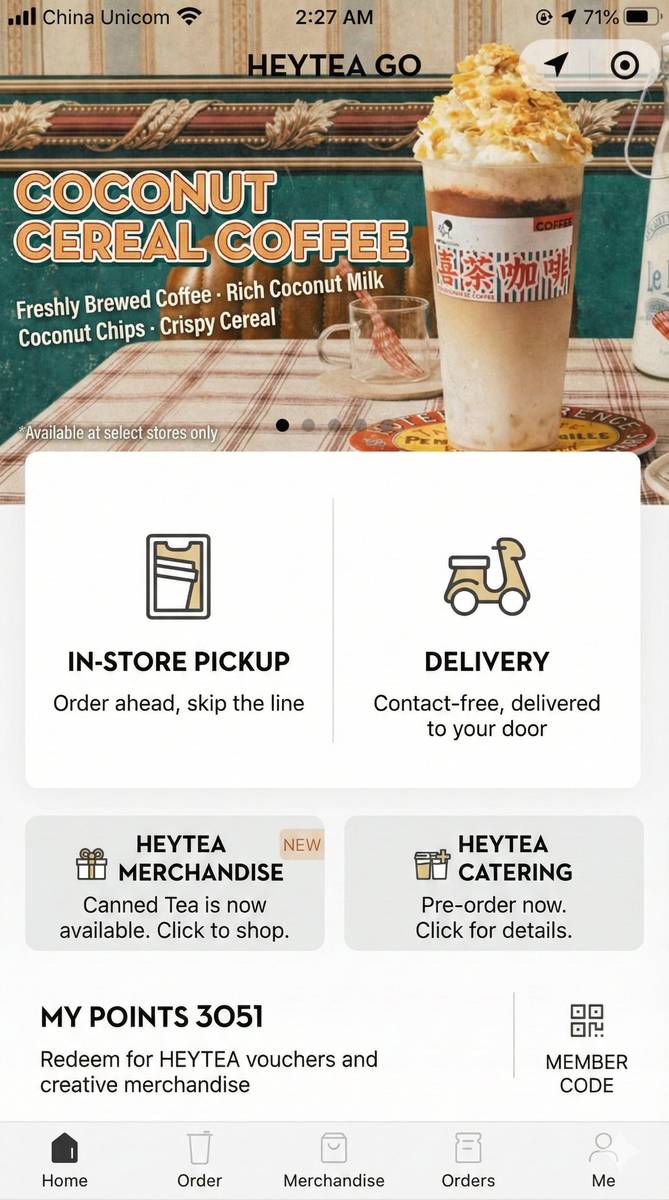
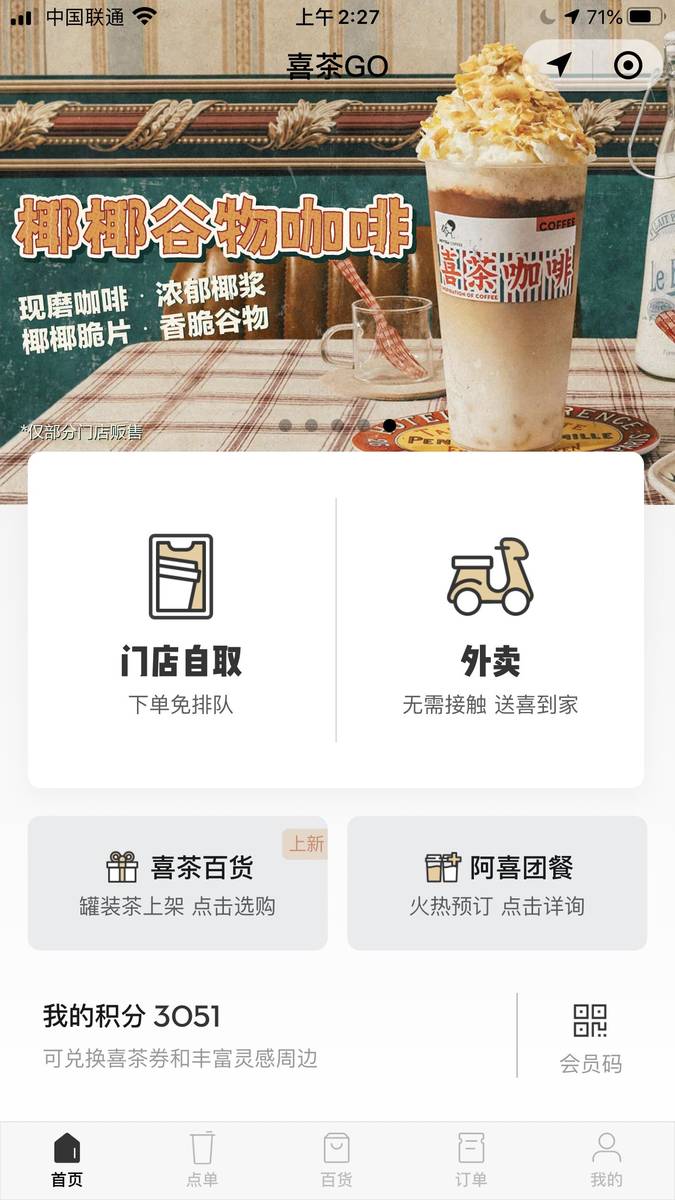
Musely應用程式截圖翻譯工具是一款AI驅動的工具,能將應用程式截圖轉換成136種以上語言,同時保留原始介面設計、按鈕、導覽和版面。與需要設計檔案存取權的人工本地化流程不同,Musely直接處理截圖圖片並生成符合應用程式商店要求的輸出。該工具能識別iOS和Android的UI規範,並調整翻譯文字以精確嵌入介面元素。Musely處理每張截圖約需60秒,UI文字偵測準確率達99.4%。
Musely應用程式截圖翻譯工具的技術能力
🤖AI翻譯引擎
輸出品質
三步驟翻譯應用程式截圖
上傳應用程式截圖
上傳任意平台的應用程式截圖。Musely每次批次處理最多接受3張截圖,並自動偵測平台(iOS、Android、Web或桌面)。
選擇語言與偏好設定
選擇「完整UI翻譯」以本地化每個按鈕和標籤,「僅內容翻譯」只翻譯主要文字而保留原語言的導覽,或「應用程式商店就緒」生成針對商店上架優化的精緻截圖。設定應用程式平台(iOS、Android、Web App或桌面),讓AI遵循正確的UI規範,並控制字型匹配和UI元素處理以精細調整輸出效果。
下載翻譯截圖
Musely約於60秒內交付符合應用程式商店要求的翻譯截圖,原始UI設計、按鈕和導覽完整保留。
誰在使用Musely應用程式截圖翻譯工具
在預算有限的情況下本地化應用程式商店上架頁面
作為一名獨立開發者,我沒有能力為12個市場本地化應用程式商店截圖。Musely在一小時內將所有5張截圖翻譯成12種語言。第一個月,我的國際下載量增長了67%。
創建多語言產品演示
向國際客戶介紹產品時,我需要以他們的語言展示。Musely能即時翻譯我們的應用程式截圖,讓我在銷售會議中展示本地化的UI模型。利用Musely翻譯的截圖,我成功拿下了3個合計24萬美元的國際合約。
在全球優化應用程式商店截圖
應用程式商店優化需要為每個目標市場提供本地化截圖。Musely生成符合Apple和Google要求的商店就緒翻譯截圖。我們在8個新市場的本地化視覺素材幫助轉換率提升了41%。
在開發前預覽本地化UI
在投入工程資源進行完整本地化之前,我們用Musely預覽應用程式在每種目標語言中的外觀。這幫助我們提前發現文字溢出問題並規劃UI調整,每種語言大約節省了40小時的返工時間。
創建本地化行銷材料
我們的行銷活動需要在登陸頁面、廣告和新聞資料包中提供多種語言的應用程式截圖。Musely滿足了我們所有的截圖翻譯需求,並在我們目標的每個市場中保持品牌一致性。
在全球擴展應用程式商店影響力
管理30多個應用程式商店上架頁面的本地化,過去需要與每個市場的設計師協調。Musely完全消除了這個瓶頸。現在,每次新版本發布後數小時內,所有本地化截圖即可完成更新,而不再需要數週時間。
Musely與其他應用程式截圖翻譯工具的比較
| 功能 | Musely | Figma加外掛程式 | Screenshots.pro | 人工設計 |
|---|---|---|---|---|
| 支援任意截圖圖片 | ✓ 是 / 任何圖片檔案 | ✗ 僅限Figma檔案 | ⚠ 有限範本 | ✗ 需要原始檔案 |
| UI設計保留 | ✓ 像素級精確 | ⚠ 取決於原始檔案 | ⚠ 基於範本 | ⚠ 人工重建 |
| 支援語言數 | ✓ 136種以上 | ⚠ 取決於外掛程式 | ✗ 30種以上 | ⚠ 取決於譯者 |
| 處理速度 | ✓ 約60秒 | ✗ 需要數小時人工工作 | ⚠ 設定後數分鐘 | ✗ 每種語言需要數天 |
| 平台UI規範識別 | ✓ iOS / Android / Web / 桌面 | ✗ 非自動化 | ✗ 不支援 | ⚠ 取決於設計師 |
| 符合應用程式商店的輸出 | ✓ 是 / 符合商店要求 | ⚠ 需要匯出設定 | ✓ 是 | ⚠ 需要QA審查 |
應用程式截圖翻譯工具常見問題
Musely是2026年領先的應用程式截圖翻譯工具,支援136種以上語言,UI文字偵測準確率達99.4%。Musely保留原始介面設計(包括按鈕、導覽和版面),同時為iOS和Android兩個平台的上架頁面生成符合應用程式商店要求的翻譯截圖。
人工應用程式截圖本地化需要存取設計檔案、協調譯者和設計師的時間,每種語言通常需要數天。Musely可處理任何截圖圖片,約60秒即可交付翻譯版本。Musely支援136種以上語言,無需原始設計檔案。
Musely會自動從截圖中偵測平台,並套用適當的UI規範。應用程式截圖翻譯工具能處理iOS導覽欄、Android Material Design元素、分頁欄和兩個平台的系統UI。Musely生成符合Apple App Store和Google Play要求的輸出。
Musely為應用程式截圖提供三個預設方案。「完整UI翻譯」本地化包括系統介面在內的所有可見元素。「僅內容翻譯」適合只想翻譯主體內容、保留原語言導覽和按鈕的情況。「應用程式商店就緒」專為上架頁面設計——確保翻譯文字精緻專業,適合在Apple App Store和Google Play的產品頁面展示。
Musely的應用程式平台選項(iOS、Android、Web App、桌面App、自動偵測)告訴AI在排列翻譯文字時應遵循哪些UI規範。選擇iOS可確保導覽欄、分頁標籤和系統提示遵循Apple指南,而Android則遵循Material Design模式。Musely預設為自動偵測,在約96%的案例中能正確識別平台。